
What you get
Why download it
- Get a clear view in 60 minutes, not weeks.
- Pick two or three growth drivers with facts, not guesswork.
- Line up your first 30 day cycle with confidence.
What the worksheet covers
- Step 1 – Map your core processes: customer journey and key internal workflows.
- Step 2 – Score speed and pain: two ratings out of 10 for each stage.
- Step 3 – Highlight gaps: low speed + high pain = strong candidates.
- Step 4 – Estimate value: “If this was 2× faster, what’s it worth?”
Columns inside the file
- Process / Stage
- Speed (0–10)
- Pain (0–10)
- Gap Zone (auto flag)
- Value if 2× Faster (£ / %)
- Notes / Owner / Next Step
Why it works
You don’t need perfect data. A quick snapshot is enough to point your next cycle at the biggest win.
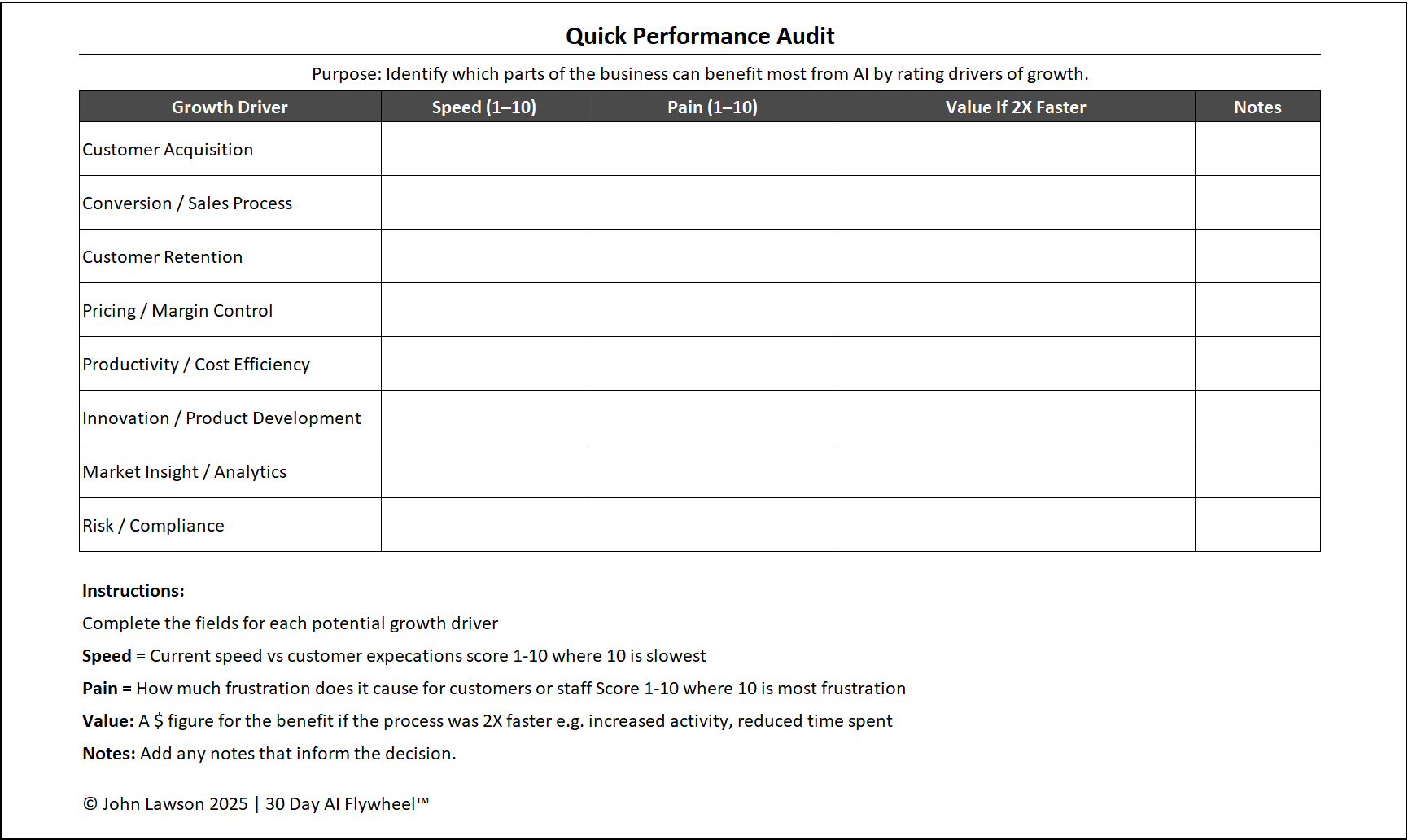

Download the Excel file
File: quick-performance-audit.xlsx
How to use
- Download the worksheet.
- If it opens in your browser, save it:
- Windows: press Ctrl + S or right click and choose Save as.
- Mac: press Cmd + S or control click and choose Save as.
- Block one hour with your team and fill in the columns.
- Pick the top 2–3 candidates and start a 30 day cycle.
Action step
Run the audit this week. Share the short list and book the kick off for your first cycle.