
What you get
Why download it
- See your business on one page and spot AI leverage points.
- Align cycles to revenue, cost, and CX — not abstract ideas.
- Create a shared view for leadership and teams to prioritise quickly.
How to build it
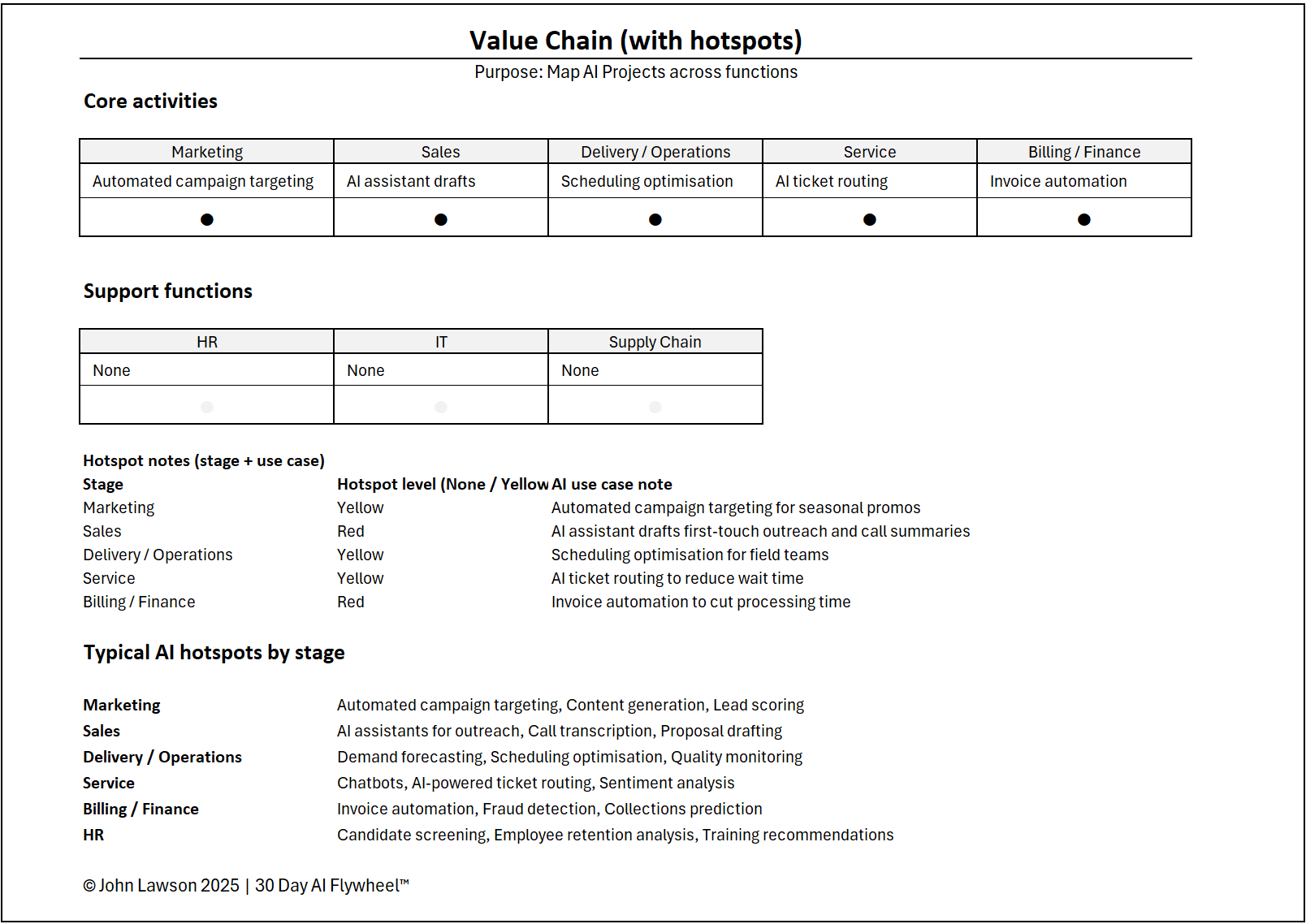
- List core activities: e.g., Marketing → Sales → Delivery → Service → Billing.
- Add support functions: HR, Finance, Supply Chain, IT.
- Mark hotspots: points where AI can remove friction or amplify results.
Typical AI hotspots by stage
- Marketing: campaign targeting, content generation, lead scoring.
- Sales: AI outreach assistants, call transcription, proposal drafting.
- Delivery / Ops: demand forecasting, scheduling optimisation, quality monitoring.
- Service: chatbots, ticket routing, sentiment analysis.
- Billing / Finance: invoice automation, fraud detection, collections prediction.
- HR: candidate screening, retention analysis, training recommendations.
What the diagram shows
- A horizontal chain of boxes labelled by stage of the business.
- Coloured circles marking AI “hotspots” on the relevant stages.
- Notes beside each hotspot describing the use case and metric affected.
Inside the file
- Value Chain sheet — editable stages and support functions.
- Hotspots sheet — Stage, Sub-process, Use Case, Metric, Data Source, Owner, Priority, Notes.
- Poster sheet — clean diagram view for decks and workshops.
Why it matters
Seeing the value chain in one view makes priorities clear. You connect AI cycles to the points that directly affect revenue, cost, or customer satisfaction.

Download the Excel file
File: value-chain-hotspots.xlsx
How to use
- Download the diagram.
- If it opens in your browser, save it:
- Windows: press Ctrl + S or right click & choose Save as.
- Mac: press Cmd + S or control-click & choose Save as.
- Customise the stages, add hotspots, and note metrics affected.
- Share with your team and feed the top three into the Fast Filtering Matrix.
Action step
Share the Value Chain Hotspots diagram and mark three AI opportunities across different stages. Use these as inputs to your filtering session this week.